
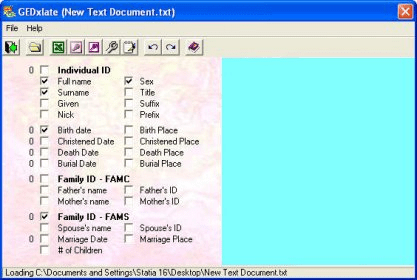
GEDxlate quickly and easily translates genealogy data from standard GEDCOM format into MS Access dB (*.mdb), MS Excel Worksheet (*.xls), comma delimited (*.csv), and text file (*.txt) formats.
Pick a GEDCOM file to translate; select which fields you want to include in your dB, spreadsheet, csv, or txt file; choose an output format and file name to save the translated data in; and you're there!





Comments (6)
Combined with Google Sheets, Ancestry, Google Lens, and a few other "free" ingredients, combine to make a pièce de résistance.
Today people use this term to describe a standout highlight, "the grand finale of a show", or the best architectural feature of a house.
I have been dabbling in Genealogy for over 40 years and GedXate is by far the best program I have ever used as a multi-format converter.
It is my opinion that it rates in the same category as Ancestry, My Heritage and Family Search and many other "top notch" programs as a "must have" for those novice and experienced, serious researchers alike.
Microsoft Windows [Version 10.0.26200.7462]
(c) Microsoft Corporation. All rights reserved.
C:\Windows\System32>C:\Windows\SysWOW64\regsvr32 C:\Windows\SysWOW64\COMDLG32.OCX
C:\Windows\System32>C:\Windows\SysWOW64\regsvr32 C:\Windows\SysWOW64\COMCTL32.OCX
C:\Windows\System32>
Now running it under Windows 11